1 long video → 10+ in clips

Other tools generate random clips and hope. Montage finds your best moments — then gives you sentence-level control to get every clip right.

Full Editorial Control
Brief-Driven AI
Publish Ready

For content teams who post weekly — not one-time experiments.

Montage user
Montage user
Montage user
Trusted by 1,000+ content producers

Sentence-Level Editing

Cut by deleting text. Trim by removing a word. Edit video the way you write.

Brief-Driven AI Scoring

Tell Montage what you're looking for. AI surfaces 8-10 clips ranked by brief match.

Publish-Ready Export

MP4 for social, XML for Premiere, FCPXML for Final Cut. 4K at full resolution.

The bottleneck isn't footage.
It's editorial bandwidth.

Even producers with large budgets don't make 50 episodes a month. The constraint is how many good editorial decisions you can make per hour of footage. Montage expands that bandwidth.

How it works

1. Upload & Brief

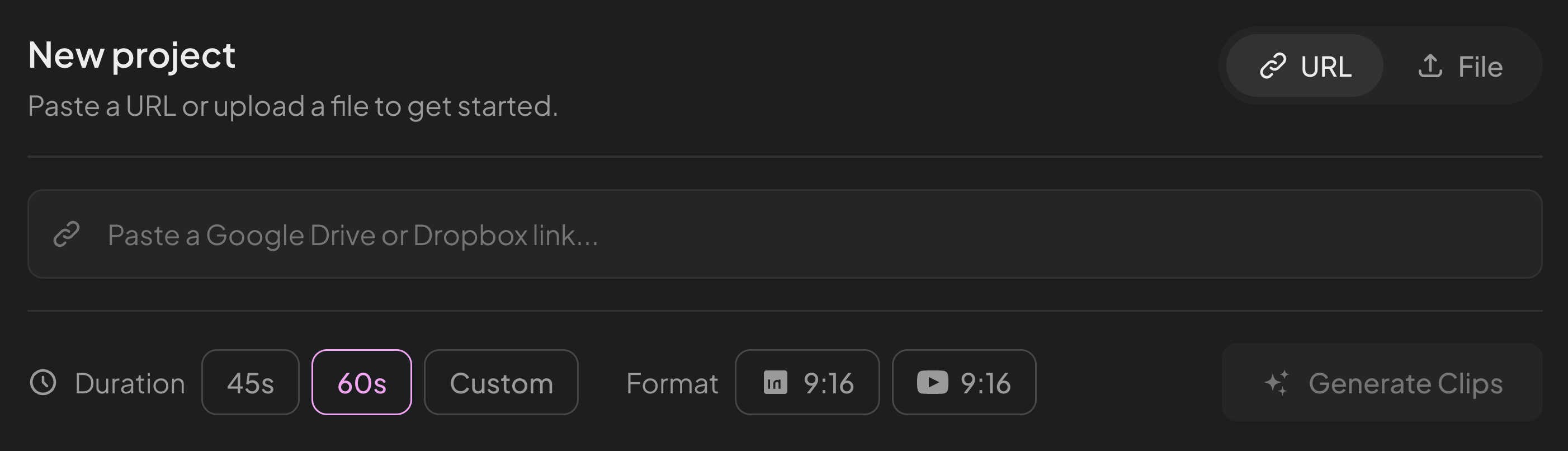
Drop your video — up to 20GB, any resolution up to 4K — and describe what you're looking for. Your brief guides which moments the AI surfaces.

2. Review Scored Moments

AI surfaces 8-10 candidates, each scored on Brief Match and Platform Fit. Review only what's worth your editorial attention.

3. Refine & Publish

Edit at the word level. Remove filler, adjust boundaries, reframe for vertical. Export publish-ready MP4 or hand off as XML.

Built For Producers

One tool. Every content team that has standards.

Every speaker deserves clips worth sharing

Upload keynotes and panels. Montage scores each moment against your brief. Edit at the sentence level, export branded clips same-day.

47 speakers → 200+ curated clipsSame-day turnaroundPer-speaker control
See Events Solution

What You Get

Built for serious video production — not toy demos

Handle 20GB files, export at 4K resolution, and edit at the word level.
Every feature is built for producers who treat content as a discipline.

Sentence-Level Editing

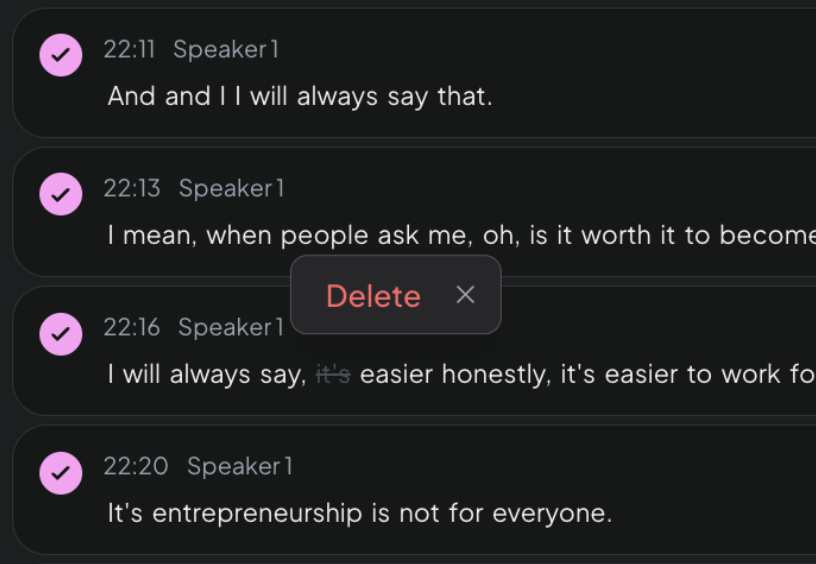
Edit video by editing text.

Highlight a sentence and delete it — the video cuts seamlessly. Adjust clip boundaries by a single word. Remove filler, tighten pacing, nail the ending. Like a Google Doc for video.

Professional Standard
Smart Reframing

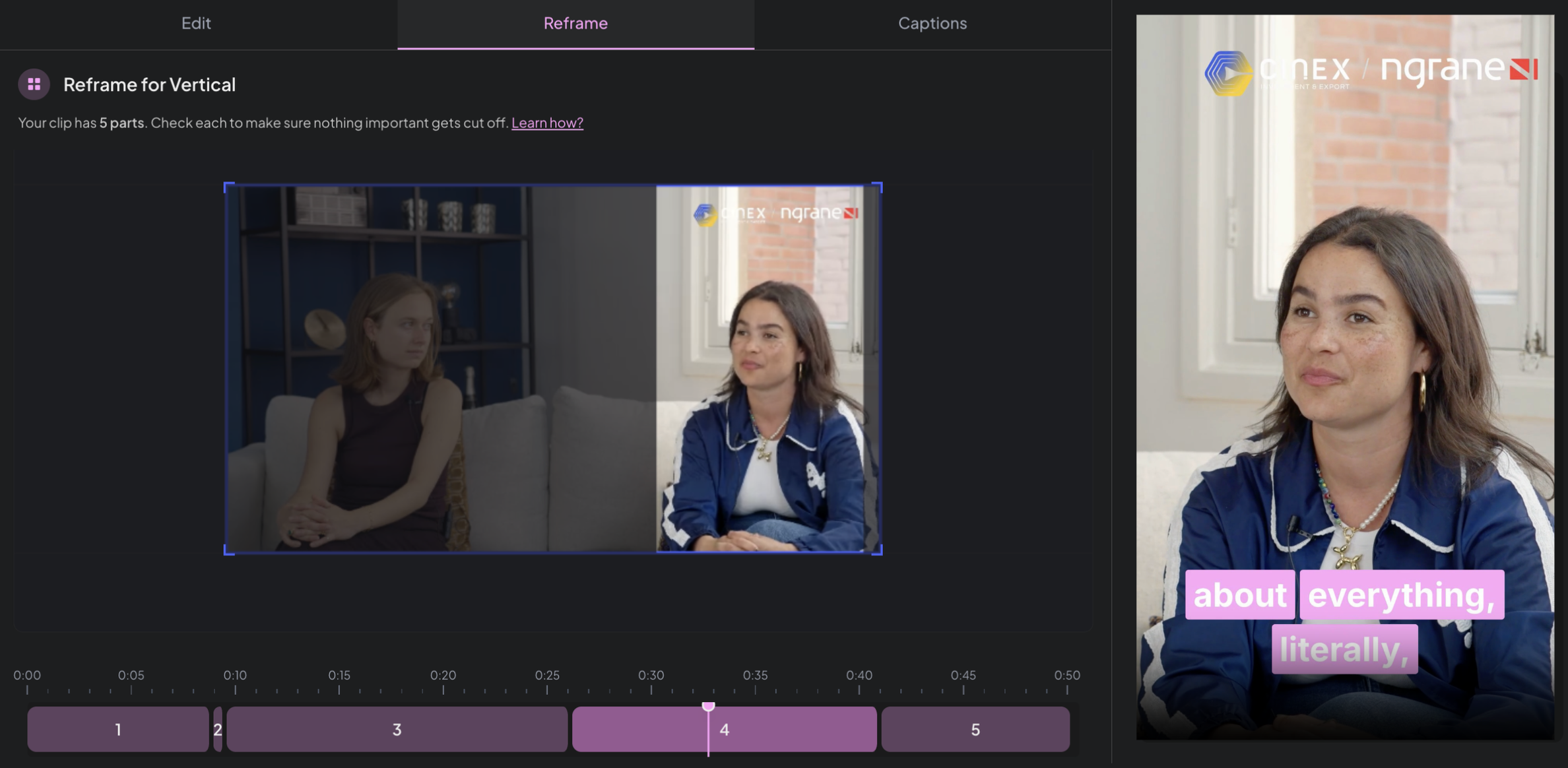
Horizontal → vertical in one click.

Speaker tracking keeps the face centered across every aspect ratio. Shoot once in landscape, export for LinkedIn (16:9), Shorts (9:16), and Reels (9:16) — each one properly framed.

Professional Standard
Branded Captions

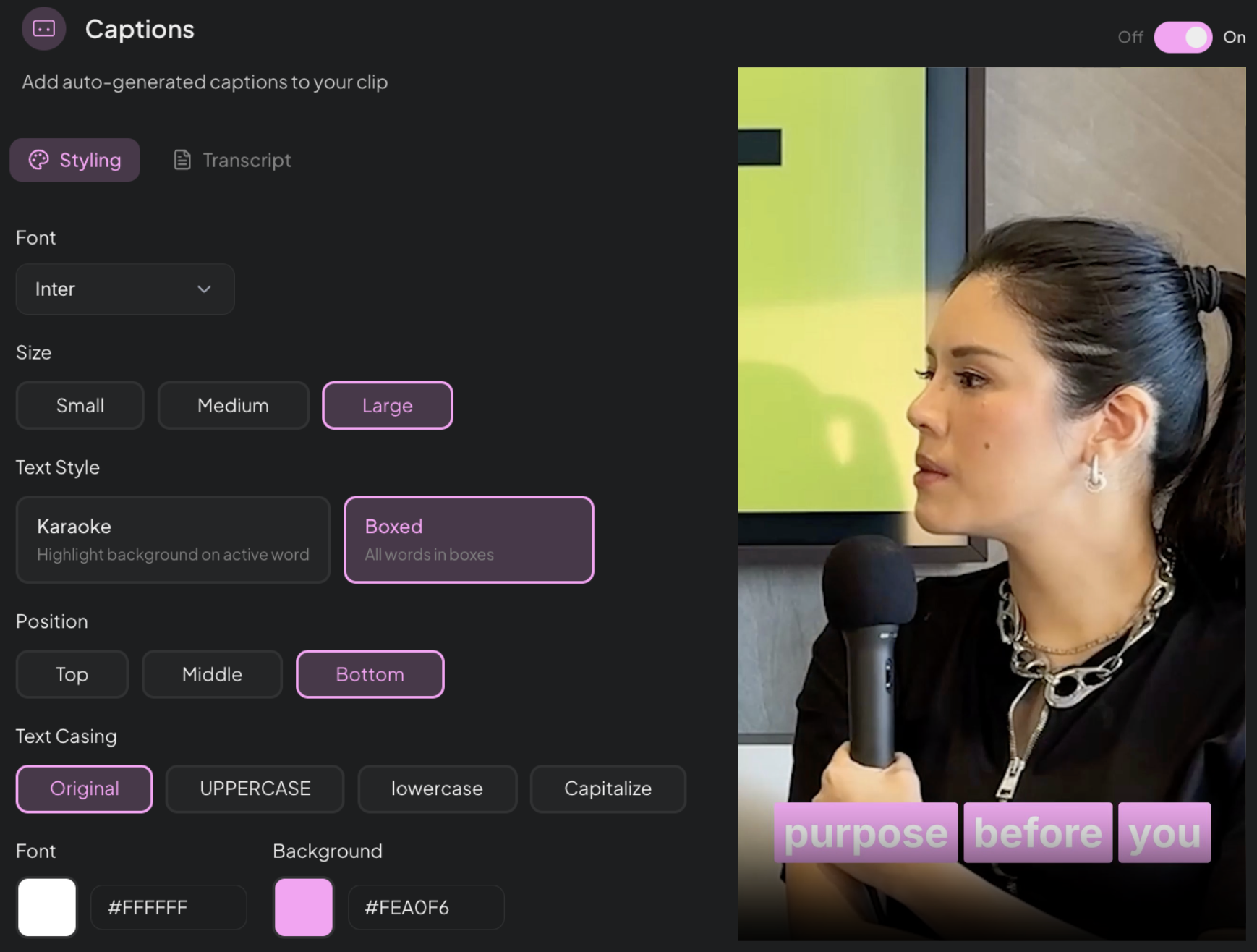
Your fonts. Your colors. Your style.

Captions that match your brand — not a generic template. Choose your typeface, set your colors, pick your animation style. Every clip looks like it came from your team, not from a tool.

Professional Standard
Multi-Format Export

Publish-ready or hand off to your editor.

Export MP4 for social. XML for Premiere Pro. FCPXML for Final Cut. JSON for custom workflows. Montage fits wherever your team already works.

Professional Standard
Videos up to 20GB

Built for real footage. Not demo clips.

Upload hour-long webinars, multi-hour conferences, full podcast seasons. Most competitors cap at 2–4GB. Montage handles up to 20GB at full 4K resolution.

Professional Standard
Montage sentence-level editing interface showing transcript with delete action
Montage reframing interface showing landscape to vertical conversion with speaker tracking
Montage captions editor showing font, size, style, position and color customization

.MP4

Social platforms

.XML

Premiere Pro

.FCPXML

Final Cut

.JSON

Custom workflows

Montage upload interface showing URL and file upload with duration and format options

Also Included

4K / Full HD Export

Process and export at full source resolution. No downscaling.

AI Clip Scoring

Clips scored and ranked automatically so you review the best candidates first.

Shareable Review Links

Share any clip as a URL. Clients and teammates review without logging in.

Google Drive + URL Upload

Import from Drive or paste any video URL. No re-uploading.

Coming SoonLaunching in the next few weeks

Background Library Indexing

Upload your entire video library while you're offline. Montage indexes everything in the background — ready when you are.

Auto Audio Enhancement

Noisy recording? Montage automatically detects and cleans up audio. No extra button — just cleaner clips.

Dynamic Reframing

Tracks moving speakers and panning cameras, not just static frames. Every reframe follows the action.

A Different Game

They optimize for speed.
We optimize for editorial quality.

Clip Generators
Montage
Optimizes for time-to-first-clip
Optimizes for quality of editorial decision per clip
Generates 30+ random clips — you hunt for the good ones
Surfaces 8-10 scored candidates — you refine the winners
Built for casual, intermittent users
Built for producers who post weekly and have standards
Take it or leave it — minimal refinement
Sentence-level editing, word-level control
Caps uploads at 2-4GB
Handles videos up to 20GB at full 4K resolution
1,000+
Content producers
20GB
Max upload size
4K
Full resolution export
8-10
Curated clips per video

Simple Pricing

Start free. Upgrade when you're ready.

No hidden fees. No per-clip charges. One price for everything you need.

MonthlyAnnual

Free

$0

Try Montage with no commitment. See what AI-powered clipping feels like.

Get Started
2 video uploads per month
Up to 5 clips per video
720p export quality
Montage branded outro
Email support

Pro

Most Popular
$49/mo

Everything you need to create professional clips. No watermarks, no limits on your creativity.

7 projects per month
Upload videos up to 1.5 hours
Unlimited clips per video
Export up to 1080p & 4K
No watermark
Live chat & email support

Need multi-client workspaces or event coverage?

Agency plans from $199/mo · Event packages from $1,999
Frequently Asked Questions

Content producers — the person who decides what gets posted. Solo creators who record weekly, agency producers managing client content, events teams turning 47 talks into clips. If you have editorial judgment and post regularly, Montage is for you.

Opus optimizes for speed — 30+ clips in seconds. Montage optimizes for editorial quality — 8-10 scored candidates with sentence-level control. Plus we handle 20GB files, 4K export, and XML handoff to professional editors.

No. You edit by editing text — like a Google Doc for video. If you need aesthetic polish on top, export XML and your editor handles it in Premiere.

Videos up to 20GB, resolutions up to 4K. Upload from your computer, Google Drive, or any URL. Export clips at full source resolution.

Yes. Share any clip as a URL — your client, speaker, or teammate can review it in the browser without logging in.

Your footage deserves better
than random clips.

Give your content the editorial attention it deserves — at the speed your calendar demands.

No credit card required · 15-day free trial